There are three names you’ll hear almost immediately when you start learning web development:
HTML. CSS. JavaScript. At first, they can feel like three completely different things you need to memorize. You might hear someone say, “I’m learning HTML and CSS,” while someone else says, “I’m a JavaScript developer.”
So naturally, you start wondering:
What exactly is the difference?
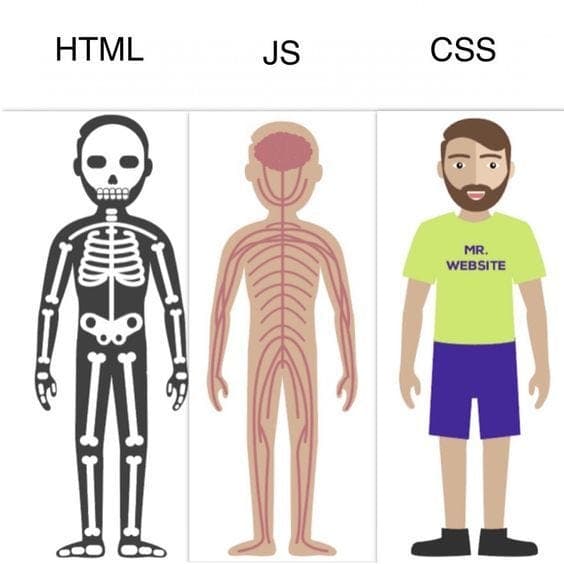
The easiest way to understand it is to stop thinking about websites for a moment and think about people.
Imagine a woman standing in front of you.
No makeup. No special styling. She’s simply there.
That’s HTML.
Now she gets dressed, applies makeup, styles her hair, and puts herself together.
That’s CSS.
Then she starts talking, walking, smiling, reacting to what you say, using gestures and interacting with the environment around her.
That’s JavaScript.
And suddenly, the three become much easier to understand.
HTML gives the website structure. CSS gives it appearance. JavaScript gives it behavior.
Let’s break that down.
HTML: The Structure
HTML stands for HyperText Markup Language, but don’t let the name intimidate you. At its simplest, HTML answers one question:
What is on this page?
A heading?
A paragraph?
An image?
A button?
A form?
A navigation menu?
HTML creates and organizes those things.
Think about our woman again.
Before the makeup, clothes, gestures, or conversation, there is already a person there.
That’s the idea behind HTML.
HTML gives a webpage its basic structure.
For example:
<h1>Welcome to Daddieshinor</h1>

<p>Technology, business, branding and life.</p>

<button>Read More</button>
This tells the browser:
“I want a heading.”
“I want a paragraph.”
“I want a button.”
But HTML doesn’t particularly care whether that button looks beautiful.
It simply says:
The button exists.
That’s the important part.
HTML is the skeleton.
It establishes the elements that make up the page.
Without HTML, there isn’t much of a webpage to style or interact with.
CSS: The Appearance
Now we introduce CSS—Cascading Style Sheets.
If HTML tells us what exists, CSS tells us the following:
How should it look?
Go back to our woman.
She’s still the same person.
But now she gets ready.
Maybe she applies makeup.
She chooses an outfit.
She styles her hair.
She puts on accessories.
Her identity hasn’t fundamentally changed.
Her presentation has.
That’s CSS.
CSS can change things like:
- Colors
- Fonts
- Font sizes
- Spacing
- Borders
- Backgrounds
- Layouts
- Animations
- Responsive behavior
- Hover effects
For example, remember our HTML button?
<button>Read More</button>
We can use CSS to make it look completely different:
button {
  background: black;
  color: white;
  padding: 12px 24px;
  border-radius: 8px;
  border: none;
}
The HTML created the button.
CSS dressed it up.
And this distinction is important.
CSS doesn’t need to create the button.
It styles something that HTML already created.
The Behavior
Now comes JavaScript.
This is where the page starts doing things.
Our woman isn’t just standing there looking good anymore.
She talks.
She walks.
She smiles.
She responds when you speak.
She points at something.
She reacts to what’s happening around her.
That’s behavior.
And that’s where JavaScript comes in.
JavaScript allows websites to respond to what users do.
For example:
const button = document.querySelector("button");

button.addEventListener("click", () => {
  alert("You clicked the button!");
});
Now the button isn’t just sitting there.
Something happens when you interact with it.
You click.
JavaScript notices.
JavaScript responds.
That’s the difference.
So What Happens When You Visit a Website?
This is where the analogy becomes even more interesting.
Imagine opening a website.
Your browser receives the website’s files and begins putting everything together.
HTML says:
“Here are the things that exist.”
CSS says:
“Here’s how those things should look.”
JavaScript says:
“Here’s what those things should do.”
Together:
HTML + CSS + JavaScript = an interactive web experience.
You can think of it as the following:
HTML → Structure
CSS → Appearance
JavaScript → Behavior
Let’s Build Something Simple
Imagine we’re building a button that says:
“Click Me.”
Step 1 — HTML creates it
<button id="helloButton">Click Me</button>
The button now exists.
But it’s probably not going to win any design awards.
So we move to CSS.
Step 2 — CSS styles it
#helloButton {
  background: black;
  color: white;
  padding: 12px 20px;
  border-radius: 8px;
  cursor: pointer;
}
Now we have a button that looks intentional.
But clicking it doesn’t do anything yet.
That’s where JavaScript enters.
Step 3—JavaScript makes it interactive
const button = document.querySelector("#helloButton");

button.addEventListener("click", () => {
  alert("Hello from JavaScript!");
});
Now we’ve created something that:
exists → looks good → responds.
That’s the basic relationship between the three.
Think About Your Favorite Website
Take Instagram, YouTube, X, Amazon, or even Daddieshinor.
Look around the page.
The logo?
HTML.
The text?
HTML.
The images?
HTML.
The buttons?
HTML.
But the way those elements are arranged, spaced, colored and presented?
CSS.
Now click something.
Open a menu.
Like a post.
Submit a form.
Search for something.
Open a modal.
Watch something load without refreshing the entire page.
That’s where JavaScript and other technologies built around it start becoming important.
And this is where beginners often make an important mistake.
JavaScript Isn’t the Entire Website
A beginner might think:
“If JavaScript makes websites interactive, then JavaScript must be what builds the website.”
Not exactly.
JavaScript is one part of the picture.
Think of building a house.
You need the structure.
You need the design.
You need the electrical systems and things that make the house functional.
A website works similarly.
HTML provides structure.
CSS handles presentation.
JavaScript handles behavior.
But modern websites can go much further.
You can eventually introduce technologies such as:
- React
- Next.js
- TypeScript
- Node.js
- APIs
- Databases
- Authentication
- Cloud services
These tools don’t replace the fundamental idea.
They build on top of it.
What Happens When You Click a Button?
Let’s slow everything down.
You see a button.
1. HTML created the button.
The browser knows:
There is a button here.
2. CSS made the button look good.
It has:
- A color
- A size
- Spacing
- A shape
- Maybe a hover animation
3. You click it.
Now JavaScript can detect that interaction.
4. JavaScript executes some logic.
Maybe it.
- Opens a menu
- Displays a message
- Changes some text
- Sends a request to a server
- Submits information
- Fetches data
- Starts an animation
And that simple button suddenly becomes part of an actual application.
The Real Power Comes From Combining Them
The most important thing to understand is that HTML, CSS, and JavaScript aren’t competitors.
They complement each other.
Imagine a person again.
HTML is the foundation and structure.
CSS is the presentation.
JavaScript is the behavior and interaction.
You don’t have to choose between them.
You learn how they work together.
That’s what makes web development powerful.
Which One Should You Learn First?
If you’re completely new to web development, don’t rush into JavaScript because it sounds more advanced.
Start with HTML.
Understand:
- Elements
- Tags
- Attributes
- Headings
- Paragraphs
- Links
- Images
- Forms
- Semantic HTML
Then move into CSS.
Learn:
- Selectors
- Colors
- Typography
- Box model
- Flexbox
- Grid
- Responsive design
- Positioning
- Animations
Then move into JavaScript.
Learn:
- Variables
- Functions
- Arrays
- Objects
- Conditions
- Loops
- Events
- DOM manipulation
- APIs
- Asynchronous JavaScript
Don’t try to memorize everything.
Build things.
That’s where the knowledge starts becoming real.
One More Thing: HTML Isn’t “Ugly” Without CSS
Our analogy is useful, but there’s an important technical distinction.
When we say:
HTML = a woman without makeup
We’re using that as a visual shortcut for raw structure. HTML itself isn’t “bad-looking.” Browsers already apply some default styles to HTML elements.
The point is simply that HTML isn’t primarily concerned with visual design.
Similarly, CSS isn’t literally “makeup.”
CSS is much more powerful than that.
It controls entire layouts, responsive interfaces, animations, spacing systems, typography, and visual hierarchy.
And JavaScript isn’t simply “talking and walking.”
It can handle complex application logic, data, events, API communication, state management, and much more.
The analogy is just the doorway.
The real lesson is structure, presentation, and behavior.
The Beginner’s Mental Model
If you remember nothing else from this article, remember this:
HTML asks:
“What is here?”
CSS asks:
“How should it look?”
JavaScript asks:
“What should it do?”
That’s it.
Once you understand that, the three technologies stop looking like three mysterious programming languages and start looking like three parts of the same system.
Final Takeaway
The web is more understandable when you stop looking at HTML, CSS, and JavaScript as separate things you have to memorize.
Think of them as a team.
HTML builds the structure.
CSS creates the presentation.
JavaScript brings interaction and behavior.
A webpage without HTML has no meaningful structure.
HTML without CSS can still work, but it may not have the visual experience you want.
HTML and CSS without JavaScript can still create useful websites, but JavaScript allows you to introduce richer interaction and application behavior.
And once you understand how these three work together, you’re no longer just looking at websites.
You’re beginning to understand how they’re built.
That’s the point where learning web development starts becoming much more interesting.
Structure. Appearance. Behavior.
HTML. CSS. JavaScript.
Now you know the difference.
Daddieshinor Tech Note
If you’re starting your journey into technology, don’t let the number of tools scare you.
You don’t need to know everything at once.
Start with the fundamentals.
Understand why something works before worrying about how many frameworks you can put on your CV.
Because frameworks change.
Tools change.
The fundamentals remain.
Learn the foundation. Then build on it.